Showing posts with label sap crm. Show all posts

SAP CRM Functional / Techinical Online Trainings by Gowtham Krishna in Hyderabad,Chennai,mumbai

SAP CRM FUNCTIONAL COURSE Conetent


  • Overview of the SAP CRM Functional Training
  • SAP CRM FUNCTIONAL

    • Introduction to SAP CRM
    • ASAP Methodology
    • MASTER DATA

    • Organizational Management
    • Territory Management
    • Business Partners
    • Products
    • MARKETING

    • Marketing Planning & Campaign Management
    • Marketing Calender
    • BP Segmentation ( Info Set, Attribute List, BW Query)
    • Mail Forms
    • ELM ( External List Management)
    • Campaign Excecution
    • Lead Management
    • Survey Management
    • Product Proposal
    • SALES PROCESS

    • Opportunity Management
    • Business Activitiy / Tasks
    • Quotation Management
    • Sales Order Management /Contract Managemnt
    • SERVICES

    • Installed Base Management
    • Service Agreements
    • Service Contracts
    • Service Order Management
    • Complaints andReturns
    • In house repair
    • Warranty Claims
    • MIDDLEWARE

    • Solution Overview
    • Data Exchange with R/3 Part 1
    • Data Exchange with R/3 Part 2
    • Middleware Operations
    • WEB UI

    • Business Roles
    • Navigation Bar Profile
    • WORK CENTER WORK CENTER GROUPS LOGICAL LINKS

    • Layout Profile
    • PFCG Role
    • BASIC FUNCTIONS

    • Partner determination Procedure
    • Text determination Procedure
    • Status Profile
    • Subject Profile
    • Org Data Determination
    • Incompletness Procedure
    • Action Profiles
    • Pricing
    • Transaction Processing
    • Item Category
    • Item Category Determination
    • Date Management

Text Determination Process in SAP CRM

Summary: Configuration of TDP in SAP CRM

Text Determination


There are three Elements to configuring Text in SAP CRM
  • Text Types
  • Text Determination Procedure
  • Access Sequences

1>Define Text Type

[Menupath: Spro > SAP Ref. IMG>  CRM > Basic Functions > Text Management > Define Text Objects and text types>Choose “Text objects and IDs > Click “Change Mode”  >doubleclick (CRM_ORDERH- (transaction header) > Create

Text Object: ZAN1
Description:  Customer Related Info
Editor Application: TX
Line Width: 040 132
Save.]

2> Define Text Determination Procedure

[ Menupath: Spro > SAP Ref. IMG > CRM > Basic Functions > Text Management > Define Text Determination Procedure > Position: CRM_ORDERH > Select : CRM_ORDERH >  Double Click “Procedure” >  New Entries >

Text Det. Proc.: ZANIRBAN
Dsccrptn Proc.: TEXT DET. PROC. ANIRBAN
SAVE.
Double Click: “Definition of Procedure” > New Entries >

Text Type: ZAN1
Sequence: 10
Enter> SAVE.]


3> Assign the Text Determination Procedure with the Transaction Type.

Duplicate Check for Accounts and Contacts in Sap CRM

Summary:Duplicate Check for Accounts and Contacts

Duplicate Check for Accounts and Contacts
You can implement a check that identifies potentially duplicate accounts or contacts during creation or editing and notifies the user. The user can decide whether the new account or contact is required or is in fact a duplicate of an existing account or contact. Duplicate accounts can be discarded or merged with another account. For more information about merging duplicates, see Data Cleansing.

Prerequisites
The duplicate check uses the interface of the Business Address Services. You activate the duplicate check in Customizing for SAP NetWeaver, under   Application Server  Basis Services  Address Management  Duplicate Check  Activate Duplicate Check and Determine Limit for BAPIs  .

Make sure that the duplicate check has been activated for both index pools (tables BUT000 and BUT052).

Features:
The duplicate check can be implemented for accounts only, contacts only, or for both.
The duplicate check is executed in the SAP CRM system in create and edit mode.

The duplicate check uses the interface of the SAP NetWeaver Business Address Service.

For More Related Tutorial Click Here

SAP CRM Middle ware Interview questions TCS,IBM,Accenture-free download in pdf,ppt.

Summary: SAP CRM Interview questions and answers on Middle ware .
  1. Explain the end to end middle ware process.
  2. What is initial load , delta load and request load? Why do we do request load?
  3. Explain the process to replicate BP's from CRM to ECC.
  4. Explain the process to replicate BP's from CRM to ECC related to specific sales org.
  5. Explain the process to replicate BP's from ECC to CRM.
  6. How can we replicate the contact persons from CRM to ECC.
  7. Explain the product replication process.
  8. How can you set up RFC connections.

                       For More interview Question Click Here

Sap CRM Function / Technical Middle Ware Complete Process

Summary:Sap CRM Function / Technical Middle Ware Complete Process free download ppt,pdf,doc. 
Basic Settings:


Connecting CRM and ECC
In R/3:
  • Check assigned logical system name � 3-digit system name � i.e. ECC
  • Create RFC Destinations � SM59 or SALE
  • Maintain table CRMCONSUM - to activate either R/3 or CRM as a consumer of the system you are maintaining the table in
  • Maintain table CRMRFCPAR � Through this table the determination of the RFC destination for the data transfer is connected with the consumer, client, object name and transfer type
In CRM:
  • Check assigned logical system name � CRM
  • Create RFC Destinations � SM59 or SALE
  • Maintain table CRMCONSUM
  • Create a Site definition - SMOEAC - start the administration console in CRM
Data Consistency

  • Solution Manager: Customizing Scout & Distribution
  • Data Integrity Manager (transaction SDIMA)Synchronization of Transactional Data
  • Requests: For data with no initial load capability
Monitoring Tools
  • Monitoring Initial Load: R3AM1
  • Initial Load: R3AS
  • qRFC Monitoring:
    • Outbound Queue Scheduler: SMQS
    • Outbound Queue: SMQ1
    • Inbound Queue Scheduler: SMQR
    • Inbound Queue:SMQ2
  • Middleware Trace: SMWT
  • Middleware Portal: SMWP
  • Bdoc monitoring: SMW01

Warranty claim processing | Business process in SAP CRM free tutorials,ppt,pdf download

Purpose

You can use this business process to create warranty claims. The warranty claim processing function allows you to create warranty claims with reference to a reference document such as a service order, and then process them while taking into consideration customer-specific issues. The process of warranty claim processing runs in the context of a case.

Process Flow

This graphic is explained in the accompanying text

...
The following process runs in SAP CRM:

       1.      Create warranty claim
You create a warranty claim with or without reference to a preceding document, such as a service order, service confirmation, or complaint. You can either create the warranty claim manually or the system can create the warranty claim automatically, such as via an action implementation.
       2.      Select items from preceding doc. that are relevant for warranty claim
You select the items from the preceding document that are relevant for the warranty claim.
       3.      Process warranty claim item
In the warranty claim item, you check and maintain the information that was copied from the preceding document, such as time data, codes, counter readings, and quantities.
       4.      Send the completed warranty claim to the vendor, with status Sent to Vendor
You send the completed warranty claim to the vendor.
       5.      Update the status of the warranty claim according to the vendor's response
The vendor checks the warranty claim, edits the status of each item as well as other item details such as quantities, values, or texts, and sends the revised document back to you, the claimant. If the warranty process is not carried out in a format that is supported by the system (such as via e-mail, fax, or telephone), you must make the vendor's changes yourself.
       6.      Create debit memo subitems
You enter the data that was authorized by the vendor in the appropriate warranty claim subitems.
       7.      Accept the vendor's offer and release the status for billing
You release the warranty claim.
       8.      Monitor status of existing warranty claims
You monitor the status of other existing warranty claims.

Opportunity processing | Business Process in SAP CRM

Opportunity processing | Business Process in SAP CRM 

You use this business process to maintain and qualify opportunities, which are recognized possibilities for business, for example, the sale of products or services. An opportunity can result from a trade fair, sales deal, bid invitation, or from a lead with the status Hot. The opportunity makes up the framework for displaying sales projects from the beginning, and monitoring their success.
An opportunity goes through a sales cycle that is characterized by different sales stages. Different activities are carried out in each sales stage. The sales cycle is determined from the point of view of time, by the start date and expected end date of an opportunity.

Process

This graphic is explained in the accompanying text.
The following business process runs in SAP CRM:
  1. Create opportunity
  2. Maintain sales team and distribute opportunity (internally or externally)
    You put the sales team together, and enter members of the sales team in the opportunity.
    You then distribute the opportunity, either internally or externally. In internal distribution, you, for example, as the sales representative or sales manager, enter an internal employee as the employee responsible for the opportunity.
    In external distribution you, in this case, as the channel manager, enter a channel partner as a sales partner and you dispatch the opportunity for further processing for this channel partner, by setting the status to Dispatched to partner
  3. Assign products or product categories
    You enter the relevant products or product categories pertaining to the prospect.
  4. Plan activities per phase
    According to Customizing settings, SAP CRM creates an activity plan that proposes specific activities (business activities and tasks) for the different stages of the opportunity.
    You activate the required activities, and add new ones as required. In this way, you put together a specific activity plan for the opportunity.
  5. Qualify opportunity
    You qualify the opportunity by using the opportunity assessment (questionnaire), together with the chance of success calculated by the system resulting from the assessment (questionnaire). Through Customizing, you can prompt the user with an assessment when the value of a parameter crosses a threshold value.
    On this basis, you decide whether the project is to be continued (go/no go decision).
  6. Use further elements of sales methodology (optional)
    You work with other elements of the sales methodology, such as the buying center, project goals, and competitor information.

Service Order Processing | Business Process in SAP CRM

Service Order Processing | Business Process in SAP CRM

Purpose

You can use this business process to create service orders and provide the relevant data for deliveries. You can also process any sales items requested by the customer and trigger the creation of an appropriate sales order.

Process Flow


This graphic is explained in the accompanying text
..
1.    Create service order (SAP CRM)

Create a service order.

2.    Maintain reference objects (SAP CRM)
You enter one or more reference objects (such as products, installed base components, or individual objects) to which the service should refer.

3.      Determine valid warranty (SAP CRM)

You use the installed base component or individual object entered in the service order to determine whether the service entered is covered by a warranty.

4.      Select product service letter (SAP CRM)

You select a product service letter (PSL) if you want to enter services to be performed so that previously identified or predictable damage to the reference objects can be repaired, or so that costly repairs and possible damage can be avoided.

5.      Search template and copy template items (SAP CRM)

You search for service order templates that were created previously for services that are used often. If you find a service order template, you copy the relevant items from the template into the service order.

6.       Create service and sales items (SAP CRM)

You create service items and enter the services in them. If the customer wants to buy a product at the same time, you also enter sales items. You can also enter service parts if they are required for performing a service.

7.    Run availability check for sales items and service parts (SAP ECC)

You trigger an availability check for the sales items and service parts.

8.    Determine valid service contract or service agreement (SAP CRM)

You trigger contract determination to find out whether service contracts or service agreements were made with the business partner, and whether these service contracts or service agreements can be applied to the service items.

9.    Determine and maintain conditions (SAP CRM)

The system uses settings (pricing procedure determination) to determine the conditions for all pricing-relevant items and uses this information to determine the prices. You can change or add conditions manually.

10.    Run credit check (SAP ECC)

You trigger a credit check. The credit check is performed based on the pricing results. The data relevant for the credit check is transferred to SAP ERP Central Component (SAP ECC) where the actual credit check takes place. The result of the credit check is confirmed to SAP CRM and saved as a credit status at item level.

11. Maintain codes (SAP CRM)

You can maintain predefined damage codes and reason codes. You can also enter detailed damage descriptions and descriptions of activities performed.

12. Select counter and create counter reading (SAP CRM)

If counters are relevant for the reference object, you enter the counter readings.

13. Perform amount allocation (SAP CRM)

You run amount allocation to define which invoice recipient pays what part of the invoice.

14. Release and save service order (SAP CRM)

You release the service order and then save it.

15. System creates and assigns appropriate controlling object (SAP ECC)

A controlling object is created for the service contract in financial accounting. Costs and revenues are posted to the controlling object, or an existing controlling object is assigned to the service contract.

16. System creates requirement for service team (SAP CRM)

The system generates reservations for the service employees assigned to the operations and for the appropriate period after saving the order.

17. System creates sales order for sales item (SAP CRM)

If you have created a sales item in a service order, the system creates a sales order for it.

18. System changes status of product service letter item for individual objects

If you have assigned a product service letter, the system changes the status of the corresponding items in the product service letter for the individual objects.

19. Create amount allocation document (SAP CRM)

You bill according to the planned amount allocation that you defined for a service order or service confirmation by creating an amount allocation document as a follow-up. You can still make changes to the amount allocation document before you trigger billing by setting it to Completed.

20. Perform amount allocation (SAP CRM)

You run amount allocation to define which invoice recipient pays what part of the invoice.

21. Specify invoice recipients and amounts for billable items (SAP CRM)

22. Specify invoice recipients and amounts for non-billable items (SAP CRM)

23. Specify final cost and revenue allocations (SAP CRM)

The system specifies and adds the following costs to the service order:

¡ Expenses from personnel capacities

¡ Cost of service parts

¡ Accrued costs

The system clears sales revenue to costs and calculates the revenue allocations.

24. Set status for billing request items (SAP CRM)

You set the status for the billing request items to Completed.

SAP CRM Functional Interview Questions and Answers

Summary:SAP CRM Functional Interview Questions and Answers
  1. What is your client business process in service?
  2.  If you get a defective product, how can you process that based on your client business process
  3. Explain the Complaint business process?
  4. What are the reference documents you are using to create Complaint?
  5. How many ways you can create the Complaint in CRM?
  6. How the warranty will determine automatically in Transactions?
  7. What you maintain in the Warranty check profile?
  8. What are the all documents which you can determine the warranty?
  9. Explain the Contract business process?
  10. Explain the difference b/w Contract and Agreement?
  11. What is the difference b/w sales contract and service contract?
  12. How many types of billing plans are there and how can you assign the billing plan to contract?
  13. How can  you assign the service level agreements to contracts? where you create the SLA's?
  14. What are the determination rules for Agreement?
  15. What are the all documents in which the customer have direct involvement?
  16. How can you determine the contracts in the Transactions?
  17. What are the all Contract determination rules?
  18. Explain the In-House repair business process?
  19. What is men't by In-House repair?
  20. What is the preceding document for In-House repair?
  21. Where you can provide the delivery after repairing the product?
  22. How many ways you can create the In-House repair in CRM?
  23. What is the difference b/w Item and a product?
  24. Explain the service order business process?
  25. What are the all items you can maintain in Service Order?
  26. Explain the Warranty claim business process?
  27. Is there any involvement of customer in Warranty claim process?
  28. Explain about service confirmation?
  29. What is the preceding document for Service confirmation?
For More Interview Questions Click Here

Sap CRM functional/Techinical Opportunity business processing online training,free material ppt,pdf download.

Summary:Sap CRM functional/Techinical Opportunity business processing

You use this business process to maintain and qualify opportunities, which are recognized possibilities for business, for example, the sale of products or services. An opportunity can result from a trade fair, sales deal, bid invitation, or from a lead with the status Hot. The opportunity makes up the framework for displaying sales projects from the beginning, and monitoring their success.
An opportunity goes through a sales cycle that is characterized by different sales stages. Different activities are carried out in each sales stage. The sales cycle is determined from the point of view of time, by the start date and expected end date of an opportunity.
Process
The following business process runs in SAP CRM:
    1.     Create opportunity
    2.     Maintain sales team and distribute opportunity (internally or externally)
You put the sales team together, and enter members of the sales team in the opportunity.
You then distribute the opportunity, either internally or externally. In internal distribution, you, for example, as the sales representative or sales manager, enter an internal employee as the employee responsible for the opportunity.
In external distribution you, in this case, as the channel manager, enter a channel partner as a sales partner and you dispatch the opportunity for further processing for this channel partner, by setting the status to Dispatched to partner
     3.     Assign products or product categories
You enter the relevant products or product categories pertaining to the prospect.
   4.     Plan activities per phase
According to Customizing settings, SAP CRM creates an activity plan that proposes specific activities (business activities and tasks) for the different stages of the opportunity.
You activate the required activities, and add new ones as required. In this way, you put together a specific activity plan for the opportunity.
    5.     Qualify opportunity
You qualify the opportunity by using the opportunity assessment (questionnaire), together with the chance of success calculated by the system resulting from the assessment (questionnaire). Through Customizing, you can prompt the user with an assessment when the value of a parameter crosses a threshold value.
On this basis, you decide whether the project is to be continued (go/no go decision).
6.     Use further elements of sales methodology (optional)
You work with other elements of the sales methodology, such as the buying center, project goals, and competitor information.


SAP CRM Functional Interview Questions Marketing and Sales free pdf download

Summary:SAP CRM Marketing and Sales Interview Questions

  1. Tell me about your client business process in marketing?
  2. What are the different campaigns your client using and explain them?
  3.  Explain the lead business process according to your client?
  4. How can you classify the leads?
  5. How the Lead will convert as a Opportunity automatically?
  6. where do we configure the Surveys and what is the Path or T-code?
  7. What are the all areas that we can use questionnaires?
  8. How can you qualify the leads?
  9. did you write any functional spec's for your client business process?
  10. Where do we configure the number range for leads and what is the object to maintain the number range for lead?
  11.  Can we create the multiple leads for a single prospect? if yes, how can we restrict that?
  12. What is the significance of an Opportunity in sales process?
  13. what is the difference b/w opportunity and sales methodology?
  14. How can you configure the sales cycle, explain step by step?
  15. What is the importance of sales assistant?
More Related Articles:
For More Interview Questions Click Here


Sap crm interview questions and answers for wipro,infosys,nttdata,hcl,saplabs online pdf,ppt,doc free download.

Summary: SAP CRM Functional/Techinical Interview questions on Master Data
  1. What are the different Business partner categories in SAP CRM
  2. Can we create BP categories in customizing.
  3. What is the difference b/w BP role and category.
  4. Can we give multiple relationships to a business partner.
  5. Can we assign sold to party role to the employee.
  6. what is the use of contact person.
  7. How many ways we can get the Business partner data to the CRM System.
  8. What are the functions in marketing
  9. What are the functions in sales
  10. What are the functions in service
  11. what are the general attributes in Org model.
  12. what are the different products of sap crm.
    For More Interview Questions Click Here

step by step procedure for copy controls in SapCRM with screen shots

Summary : what are the copy controls in Sap CRM ?
Copy Transaction or Follow up transaction

Follow-up transaction:-
A follow-up transaction represents the next business transaction in the current business process
·         For example, from a released Sales Contract, Sales Orders can be created.
Lead   --------------------------à opportunity
Opportunity----------------------àQuotation
Quotation -----------------------à Sales Order
                       Or
Lead --------------------à Quotation/Sales Order (directly based on client requirement)
Like this we can create (copy ) one business transaction  type to another business transaction type by using Follow up Transaction option.
·         Thus in this case, Sales Order is viewed as a follow-up document for the Sales Contracts

·         In case, a follow up transaction is created from a business transaction:
·         it is possible to configure the transaction type for the follow-up transaction
·         header data is copied
·         you can select items
·         transaction history is updated
·         for this copy control setting should be maintained

·         this flow can be seen in the Transaction History assignment block

Transaction History assignment block of a business transaction
·         Following are the required settings in the copy control settings:
Ø  Copy control for transaction types
Ø  Copy control for item categories
Ø  Settings for target transaction type are maintained
Ø  Determination of the item category during the copy (optional)
Ø  Implementation of CRM_COPY_BADI (optional)
  • In SAP CRM BAdI definition CRM_COPY_BADI is provided for implementation to write your own data transfer routines.
  • You can access the interlink-age between business transactions at header and item level through the transaction history data.
  • SAP CRM also provides option Subsequent Referencing, where you can link an activity while it is being created to an existing activity.
  • This will make the new transaction a follow up to the existing one.

Copy:-
By using this concept we can copy the Businesss Transaction type to same Business Transaction type
For example ,
             Lead ---------------------à Lead
            Opportunity -------------àOpportunity
Quotation ---------------à Quotation
Sales Order ------------à Sales Order
Eg:-a sales order can be copied to create another sales order 
Like this we can copy one transaction to same transaction type .here we can’t copy one transaction type  to another transaction type.

In case, a business transaction is copied:
·         transaction type is same
·         header and item data is copied
·         transaction history is not updated
·         no relation to the source transaction is maintained

From an existing business transaction it is possible to create a copy or to create a follow up transaction.

Basic Functions in Business Transactions
·         Basic functions in Business Transactions:
·         Text Determination
·         Date Management
·         Status Management
·         Incompleteness Check
·         Partner Processing
·         Action Processing
·         Pricing
·         For each business transaction in SAP CRM it is possible to maintain different notes.

·         As per the requirement, it is possible to combine a number of text types in the text determination procedure.

·         Text determination procedures are used in the business transactions for different relevant texts in the transaction.
·         CRM Web UI provides assignment blocks to
·         Create a new text with a particular text type.
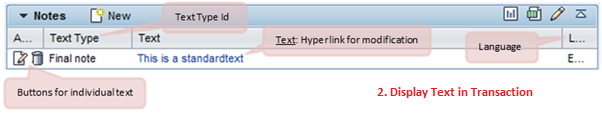
·         Display the text in the business transaction
·         Modify the particular text
·         With date management it is possible to process the dates that are relevant for the business transaction.
·         It consists of:
·         Date type
·         Date rule
·         Duration
·         Date Profile

·         This date management system also supports conversion of saved dates to user time zones and considering the factory calendar in business transaction.

·         Dates in a business transaction can be entered manually or can be calculated by the system using the date rules.
·         Status management Allows maintaining user statuses in a status profile for business transactions.
·         It consists of status profile which is assigned to a business transaction.
·         If status profile is not assigned to business transactions type/item categories, system statuses are displayed in the application.

·         Following can be defined in a status profile:
·         Activation sequence of user statuses
·         An initial status/start status
·         Set transaction status connected with user status
Activity Management
·         Activity management is an example of the business transactions in the SAP CRM.
·         An activity represents an activity performed by an employee in the organization
·         It also covers the scenario where there is an interaction of the employee with a particular business partner involved in the business transaction
·         Activities can be linked as follow-up documents to various business transactions like Sales Order, Service Order, etc., provided as part of difference CRM modules like Sales, Marketing and Services
·         Technically -
·         Information about interaction with the business partner on a particular date is contained by a Business Activity
·         Information about activities that one or more employee has to complete by a particular date is contained by a Task
·         SAP CRM provides different type of activities to cover different channels of communication with the business partners involved in the business transactions

Types of Activities:

·            Similar to the other business transaction types, activities contains data related to the processing of the involved business process for example the interaction with a business partner involved in the business transaction

     Structure of activities:


Popular Posts