Columbus opening jobs for CRM Senior Account Executive in United States - Michigan-Detroit

Summary: CRM Senior Account Executive

Position Overview

The Senior Account Executive’s primary responsibility is to qualify software prospects, rapidly design and execute on a business development plan for these prospects and foster positive client relationships.  Account Executives will also work closely with Microsoft local sales representatives for their assigned regions in identifying and qualifying potential new clients.

Position Title:            
Senior Account Executive
Reports to:                 Vice President of Sales
Department:              Sales
Team/Vertical           Columbus US Enterprise Sales
Location:                    United States/Midwest
Position Type:            Full-time / Exempt
EEO Class:                  Professional

Duties & Responsibilities 

  • 100% Time Allocation to Sales and Lead Generation within assigned region and/or vertical focus
  • Strict Adherence to Columbus Solution Selling process & Sure Step+
  • Manage sales cycle and maintain positive relationships with customers throughout the entire process
  • Assist in development of new sales team members
  • Generate customer leads through networking and cold calling
  • Participate in company marketing events
  • Manage Sales Engineers, Project Managers, Industry Solution Architects, Sales Assistants and Consultants as it relates to the Sales Process and Opportunity Engagement
  • Provide proper reporting and forecasting the management
  • Assist in customer and vendor issue resolution
  • Maintain internal CRM database

Credentials & Experience

  • College degree in a related discipline required
  • Professional certification and accreditation a plus
  • Microsoft Dynamics Solution Selling certification or related discipline is a plus
  • (3) or more years of experience in CRM Sales

Knowledge & Skill Requirements
  • Knowledge of  best practices, principles and procedures as related to mid-to-large scale business processes
  • Demonstrable knowledge of applying sales techniques, especially Sure Step+ methodologies for CRM Sales
  • Ability to understand, communicate, and interpret client business processes and requirements
  • Ability to thrive in a collaborative atmosphere
  • Excellent organizational skills with the ability to balance multiple demands
  • Proven ability to write effective system and process documentation - including business and system requirements, process diagrams, and data flow charts
  • Exceptional customer service skills
  • Effective time management skills
  • Fluent in English - both written and verbal - mandatory
  • Basic knowledge of CRM systems as they relate to effective and efficient business processes
  • Ability to communicate effectively with all levels of an organization
  • Ability to establish priorities, work independently and proceed with objectives with little supervision
  • Resolve conflict

Special Requirements

  • Willing to work overtime as needed and requested
  • Travel requirements – minimal
  • Must be able to work in the United States

                                        Apply Now :Click Here
                                        For Similar Jobs :Click Here

Microsoft Dynamics CRM 2011 Bing Maps Silverlight Control For All Browsers

Summary: Microsoft CRM 2011 Bing Maps
After many months of work and some great customer feedback from all of our customers using eMap for MS CRM 2011 we now have a new release with a range of new functionality which extends data visualisation and manipulation even further in the Microsoft CRM interface. 
The new functionality includes
1.       Pivot Data through relationships
2.       View Selector at entity layer
3.       Default Pan and Zoom

Pivot Data and Pivot Rules though data relationships
One of the great new features with eMap is the ability to pivot related data from a single pin, this means you can now select a single Account pin and show related data on the map for that account based on a configurable rule.
Rules are created in the settings and can be used on different layers

You can create a rule that maps a relationship to the data that is requested for the relationship to display
As an example you can see below the data for the Isle of Wight, this is where MyCRM is based and in the first screen shot you can see all related data  

 Now by switching the pivot view on you only see related data for the Account Record based on the rule 


This is a very powerful option as it enable end users to identify single customers with related data and work directly with those records selected.
View Selector at entity layer
Another of the great new features for this release of eMap is the ability to switch on the view selector at the layer level, which gives end users the ability to quickly switch data views .
By switching this setting on end users have access to system and personnel views that have been created on the CRM system for the data type.

This extend further the ability to visualize CRM data on a map interface and work directly with different view sets.
 Default Pan and Zoom

The final new feature in this release of eMap is the ability to set the default pan and zoom when loading a Map in CRM  
The map centre can be set to “All Pins” or “Form Entity”. “All Pins” is the current default behaviour and zooms and pans the map to fit all available pins.
 New settings “Form Entity” only works on Form maps, and will set the centre of the map to be the location of the form entity. When this option is used, a default zoom level can also be set.

To get access to the latest version of eMap either view setting in the MyCRM licence manager where eMap is install or head to our application download centre to get a 14 day trial


step by step procedure for copy controls in SapCRM with screen shots

Summary : what are the copy controls in Sap CRM ?
Copy Transaction or Follow up transaction

Follow-up transaction:-
A follow-up transaction represents the next business transaction in the current business process
·         For example, from a released Sales Contract, Sales Orders can be created.
Lead   --------------------------à opportunity
Opportunity----------------------àQuotation
Quotation -----------------------à Sales Order
                       Or
Lead --------------------à Quotation/Sales Order (directly based on client requirement)
Like this we can create (copy ) one business transaction  type to another business transaction type by using Follow up Transaction option.
·         Thus in this case, Sales Order is viewed as a follow-up document for the Sales Contracts

·         In case, a follow up transaction is created from a business transaction:
·         it is possible to configure the transaction type for the follow-up transaction
·         header data is copied
·         you can select items
·         transaction history is updated
·         for this copy control setting should be maintained

·         this flow can be seen in the Transaction History assignment block

Transaction History assignment block of a business transaction
·         Following are the required settings in the copy control settings:
Ø  Copy control for transaction types
Ø  Copy control for item categories
Ø  Settings for target transaction type are maintained
Ø  Determination of the item category during the copy (optional)
Ø  Implementation of CRM_COPY_BADI (optional)
  • In SAP CRM BAdI definition CRM_COPY_BADI is provided for implementation to write your own data transfer routines.
  • You can access the interlink-age between business transactions at header and item level through the transaction history data.
  • SAP CRM also provides option Subsequent Referencing, where you can link an activity while it is being created to an existing activity.
  • This will make the new transaction a follow up to the existing one.

Copy:-
By using this concept we can copy the Businesss Transaction type to same Business Transaction type
For example ,
             Lead ---------------------à Lead
            Opportunity -------------àOpportunity
Quotation ---------------à Quotation
Sales Order ------------à Sales Order
Eg:-a sales order can be copied to create another sales order 
Like this we can copy one transaction to same transaction type .here we can’t copy one transaction type  to another transaction type.

In case, a business transaction is copied:
·         transaction type is same
·         header and item data is copied
·         transaction history is not updated
·         no relation to the source transaction is maintained

From an existing business transaction it is possible to create a copy or to create a follow up transaction.

Basic Functions in Business Transactions
·         Basic functions in Business Transactions:
·         Text Determination
·         Date Management
·         Status Management
·         Incompleteness Check
·         Partner Processing
·         Action Processing
·         Pricing
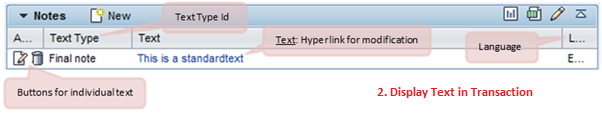
·         For each business transaction in SAP CRM it is possible to maintain different notes.

·         As per the requirement, it is possible to combine a number of text types in the text determination procedure.

·         Text determination procedures are used in the business transactions for different relevant texts in the transaction.
·         CRM Web UI provides assignment blocks to
·         Create a new text with a particular text type.
·         Display the text in the business transaction
·         Modify the particular text
·         With date management it is possible to process the dates that are relevant for the business transaction.
·         It consists of:
·         Date type
·         Date rule
·         Duration
·         Date Profile

·         This date management system also supports conversion of saved dates to user time zones and considering the factory calendar in business transaction.

·         Dates in a business transaction can be entered manually or can be calculated by the system using the date rules.
·         Status management Allows maintaining user statuses in a status profile for business transactions.
·         It consists of status profile which is assigned to a business transaction.
·         If status profile is not assigned to business transactions type/item categories, system statuses are displayed in the application.

·         Following can be defined in a status profile:
·         Activation sequence of user statuses
·         An initial status/start status
·         Set transaction status connected with user status
Activity Management
·         Activity management is an example of the business transactions in the SAP CRM.
·         An activity represents an activity performed by an employee in the organization
·         It also covers the scenario where there is an interaction of the employee with a particular business partner involved in the business transaction
·         Activities can be linked as follow-up documents to various business transactions like Sales Order, Service Order, etc., provided as part of difference CRM modules like Sales, Marketing and Services
·         Technically -
·         Information about interaction with the business partner on a particular date is contained by a Business Activity
·         Information about activities that one or more employee has to complete by a particular date is contained by a Task
·         SAP CRM provides different type of activities to cover different channels of communication with the business partners involved in the business transactions

Types of Activities:

·            Similar to the other business transaction types, activities contains data related to the processing of the involved business process for example the interaction with a business partner involved in the business transaction

     Structure of activities:


Step by Step Business Transaction Process in SAP CRM 7.0

What is a Business Transaction?
·         Business Processes in SAP CRM:

               Business transaction provides business structure and the functions that can be used, that can be used to control and mange the business process of any company. In SAP CRM business transactions are used  to represents business interaction of your organization with various business partners.
                In SAP CRM each and every Business transaction Type look and feel  is always  same but coming to functionality side each and every Business transaction Type is different.
A Business transaction provides the business structure and it also   consisting of Leading Business Transaction Category. The   Business structure depends up on Business Transaction Category.
In SAP CRM the business transaction   consists of the  header level and the item level.

Header (General) and Item Data representation in a Business Transaction

Transaction Types Item Categories and Category Description
·         Transaction Type structure:
Ø  A transaction type defines:
o    attributes
o    characteristics
o    controlling attributes
Ø  In SAP CRM business transaction processing is controlled by a transaction type
Ø  The leading business transaction category in an transaction type controls:
o    specific settings that can be applied on a lower level
o    other business transactions categories to which it could be assigned
o    detailed control of the transaction
Ø  The properties and attributes of a business transaction item are specified by an item category.
Ø  Item category controls how the item is processed.

·         First an item category needs to be assigned to an item object type that defines the business context in which an item category is used.

Similar to transaction types, an item category can be assigned to one or more business transaction categories.

Item category Determination:

Item Category determination depends upon:
·         Transaction Type
·         Item Category Group
·         Item Category Usage
·         Main Item Category
Ø  Item Category Group is a field in the product master.
Ø  Item Category Usage comes from the programming logic.


Popular Posts